
After the last blog post about VPS employment, I wanted to deploy a minimal Vaadin application without managing infrastructure. The goal is simply: take the Hello World app from start.vaadin.com and run it in production with HTTPS, logging, and zero server maintenance.
I wanted Git-based deployment, automatic builds, and managed runtime and no provision of a VPS, configure Docker manually, or maintain a CI pipeline. Preferably an European provider. For all this, Clever Cloud builds directly from Git, supports Java applications natively, and handles TLS and routing out of the box.
.png?width=500&height=563&name=Clever%20Cloud%20deployment%20(2).png)
Generate a Vaadin Application
For testing this workflow I generated a default Vaadin application from start.vaadin.com. Just selected standard setup: Java, Maven, and the latest Vaadin version.
Unzip the project in your terminal:
unzip app.zip
cd app
This sample application implements a simple Vaadin UI for a database. It is intended as a starting point for your own project, but here we use it to test the deployment process to Clever Cloud. You might still want to build and run locally once to check how everything works:
./mvnw spring-boot:run
This should also automatically open your browser in development mode to verify at http://localhost:8080. And you can simply stop the server with CTRL-C in the terminal.
Initialize local Git (if needed)
You need a Git to deploy to Clever Cloud. Vaadin default starter should already come with a local Git repository with properly ignored build files.
git init
git add .
git commit -m "initial commit"
Here is a minimal .gitignore (Vaadin + Maven):
# IDE and Project files
/target/
.idea/
.vscode/
.settings
.project
.classpath
*.iml
.DS_Store

# Node / Vaadin frontend
node_modules/
src/main/frontend/generated/
vite.generated.ts
Create the Application in Clever Cloud (Web Console)
Before we can deploy the app, we need some basic setup in the Clever Cloud Console:
- Click Create... ⟹ an application
- Select Java+Maven
- Choose a name: “vaadin-app”. This will also be the URL for the application.
- Select region: Paris, France
- Click Create
- This app is simple so just click I don’t need any add-ons
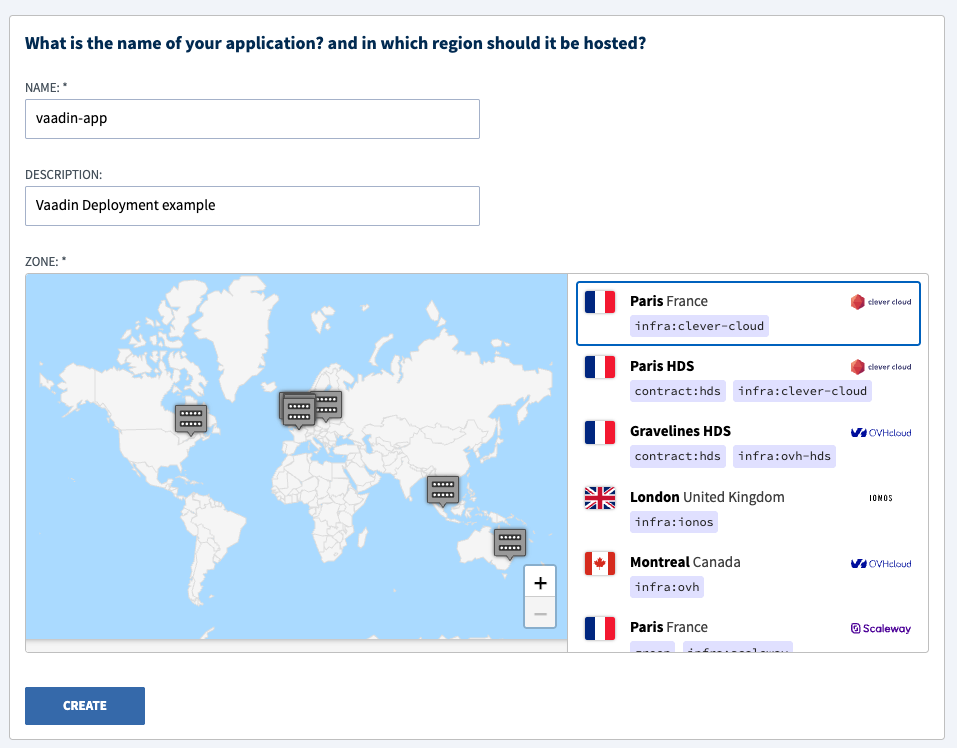
The Clever Cloud console will present the deployment target Git repository URL which you can add to your local Git configuration.
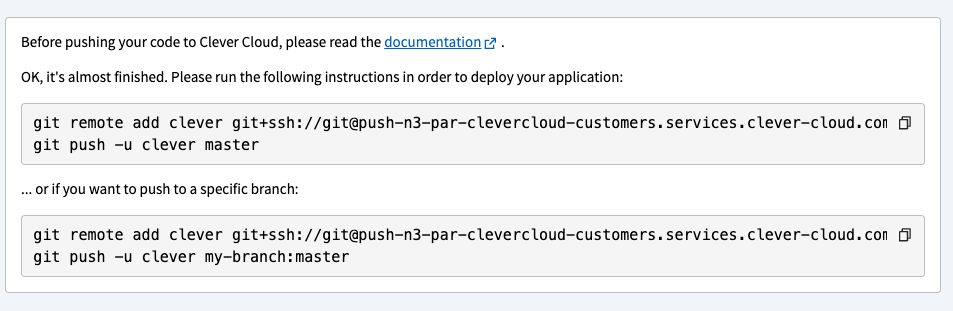
Copy the Git remote URL (HTTPS or SSH) and back in your project setup and verify new remote for publishing:
git remote add clever <REMOTE_URL_FROM_CONSOLE>
git remote -v
There is still one piece missing: Authorization. Pushing to the remote fails before the SSH connection is configured correctly. We can set up that in the console and add our SSH public key:
- Go to Profile ⟹ SSH Keys at https://console.clever-cloud.com/users/me/ssh-keys
- Add the Public key (.pub). You can copy it in your Mac terminal like
cat ~/.ssh/id_ed25519.pub | pbcopy, give it a name, paste the key and click Add key.
Now you have the remote called ‘clever’ ready for the first deployment.
Runtime settings for a Spring Boot app
Maven deployment in Clever Cloud simply runs a specified Maven goal. If you don’t specify this, you will see [ERROR] Error: goal is missing for deploying with mavenin your logs.
To fix that, in the app settings add the Maven goal to build the application as well as the command to start the app:
CC_RUN_COMMAND="java -jar target/app-*.jar"
MAVEN_DEPLOY_GOAL="package"
This obviously works for all Spring Boot apps, not just Vaadin apps. This will also automatically make a production build and exclude all development dependencies from the application.
Git based deployment workflow
After this the deployment is just like working with Git in general and pushing to the remote repository. Please note here that the local branch is main while the remote branch is called master. If your project is also in GitHub, you might want to use a separate deploy branch instead.
git push clever main:master
Build and deployment will take some time to to finish, and you can validate the app at
https://app-e762af19-e4f4-4515-a036-4bff848a371c.cleverapps.io/
The benefits of a PaaS are clear: No Docker setup. No reverse proxy. No SSL configuration. No extra tooling needed locally. This is a reproducible deployment model suitable for most JVM-based applications with Vaadin frontend. Plus what I especially like is that the cold start times keep at the same level as on a VPS.
I hope this was useful. Next time, I promise to jump into the world of containers. :)