
Every business application has a list of things users wish it did. "Let me do this for all 40 rows at once." "Remind me every Monday and fill in the usual." "Take the numbers from this app and put them in that one." Most of these never make it to the roadmap, and fair enough: there are always more of them than there are developers.
At the same time, a new kind of user has shown up: AI agents. They want to use your application too, and the usual answer is to build them a separate interface (an MCP server, a set of tools, an API with its own permissions) and then keep it in sync with the real one.
We've been experimenting with a different approach. We call it Draiv (as in drive, said with a Finnish accent), and the idea is simple: let scripts, macros and AI drive your Vaadin application through the UI you already have. Record a workflow once, replay it on demand or on a schedule, then hand the same wheel to an AI, under the same rules your users play by.
The problem
From the user's point of view, apps have gaps:
- Missing flows. The app does A and B, but the user needs A-then-B-then-A-again, and there's no button for that. There never will be a button for every workflow.
- Repetitive tasks. Opening forty rows one by one to change the same field is nobody's idea of a good afternoon.
- Scheduled tasks. "Every Friday, collect the hours and submit the report" is easy to say and surprisingly hard to get built.
- Working across apps. We see more and more people wanting an external agent (Claude, ChatGPT, whatever comes next) to combine several applications into one task.
From the developer's point of view, the AI part brings its own headaches. An MCP server is basically a second interface to the same application, just for a different kind of user. It has to be designed, built, secured, and kept up to date with every change to the real UI. Then there's trust: will it do the same thing every time, and what will it cost in tokens? Most options trade flexibility for safety or cost. A fixed set of hand-written tools is safe and cheap but rigid; "just give the AI the database" is flexible and terrifying.
What a Vaadin UI makes possible
In a Vaadin Flow application, the UI lives on the server, as a tree of Java components. That turns out to be handy here, for reasons that are easy to take for granted.
You can drive the UI programmatically. Setting a field value, clicking a button or selecting a grid row are just operations on server-side components. That's why Vaadin UI unit tests run so fast, and it's what a macro or a script needs too.
You can do it with or without a browser. A Vaadin UI doesn't need a browser to exist. So you can:
- drive the UI the user is looking at, live, while they watch
- perform tasks headlessly, fetching information or doing work in the background while the user is doing something else
- run scheduled tasks, with nobody logged in
- let external agents use the application over MCP, without spinning up a browser for them
The permissions are already there. Your UI already defines what a user can and can't do. The Delete button isn't there for users who aren't allowed to delete; the admin view isn't reachable for non-admins. When something drives the UI, it goes through those same rules, from the buttons it can see to the route and backend checks behind them. You don't build a separate permission model for it.
And because it's just the normal security setup, you get to choose how the automation runs. An AI can run as the user, as a separate user (a service account for scheduled jobs, for instance), or as the user with roles added or removed. In our demo app, the assistant runs as you but without the right to submit an expense: it can prepare the draft, but you press the button. You define that the same way you define everything else in your app.
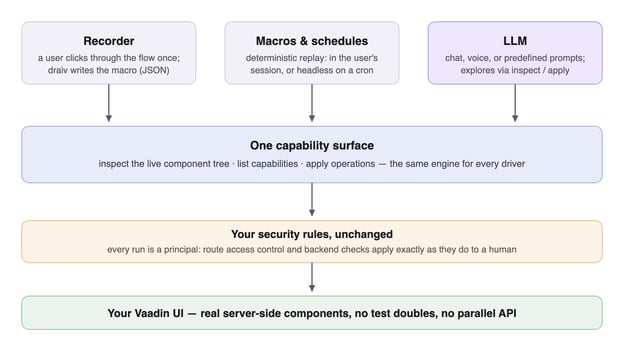
Put together, the UI you already have becomes the interface for automation and agents too. Underneath sits one capability surface that can inspect the live component tree, list capabilities and apply operations. A recorded macro, a cron trigger and a conversational AI all go through it; the difference between them is how much freedom they get. A script can do whatever the identity it runs as can do, and nothing more.
Recording a macro
Start with the simplest driver. Hit Record, click through the flow like any user, and Draiv writes the macro for you. A macro is a small JSON document (steps that navigate, set and click, plus declared inputs) readable enough to review and edit by hand:
{
  "name": "send-chat-message",
  "inputs": [{ "name": "message", "type": "string" }],
  "steps": [
    { "op": "navigate", "to": "messageinput-demo" },
    { "op": "apply", "id": "chat-input",
      "capability": "submittable", "operation": "submit",
      "args": ["${message}"] }
  ]
}
Saved macros show up as one-click actions on the start screen. Declared inputs prompt at run time, so one recording becomes a small parameterized tool, and no developer is needed. Macros target components by their labels and ids, the same cues a person uses, so they don't depend on where a field sits on screen or how the page is built, which is what breaks pixel- or DOM-based automation.
Running it on a schedule
The same macro replays headlessly: Draiv builds the UI server-side and runs the steps against it, no browser attached. Wire that to a cron expression and you have scheduled back-office automation that never left your application, and every run comes with a per-step audit trail.
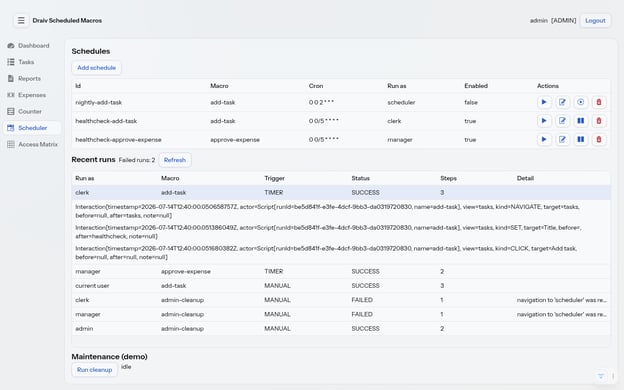
Note the Run as column. A headless run is not a superuser: it authenticates as a principal, and your existing Spring Security setup (route access control, @RolesAllowed, backend checks) applies exactly as it does to a human. Run the very same macro as an admin and it goes through; run it as someone without the rights and it fails, saying why.
Letting an AI drive
Nothing above was macro-specific, and that's the part we find most exciting. An LLM can hold that steering wheel just as well as a recorded script. Through chat, voice or a prompt you predefined, the model explores the live UI and operates it.
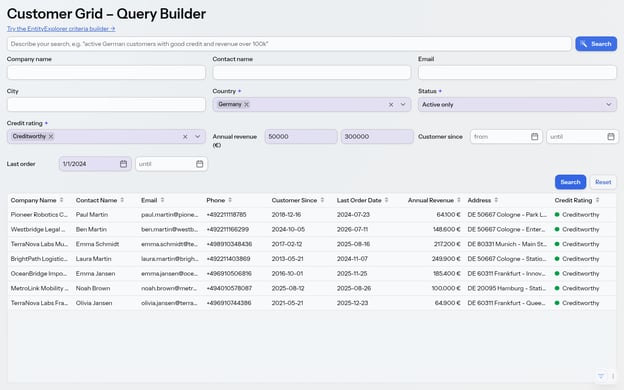
Because the AI writes into the very fields your users see, its work is reviewable: the user sees exactly what was filled in, tweaks it, and continues. Draiv marks every field the AI touched, either with a one-shot glow while it works or with a mark that stays until the user edits the field by hand.
In one real run we asked for "active customers in Germany with Creditworthy rating, revenue between 50 000 and 300 000, last order after 2024". The model filled the form and clicked Search. The marked fields in the screenshot are the ones it filled, and they show one slip: it read "after 2024" as "from 1 January 2024", so two customers whose last order was in 2024 made the list. Because the date sits in an ordinary, marked field, spotting and fixing that takes seconds:
The security model doesn't change either. The AI acts within a user's session, as that user. It cannot reach a view or press a button its principal couldn't: the model is told "no" by the same access control that guards your users, not by a prompt pleading with it to behave.
What about efficiency?
We'd pick Draiv for the reasons above before efficiency: the agent works under the permissions your users already have, and the user and the agent can work on the same screen together. Efficiency is a bonus.
It is the question everyone asks, though. The easiest way to give an agent access with no integration at all is to let it drive the app in a browser: look at the page, click, like a person. Draiv also works through the UI, but instead of a screenshot and a click per step, the agent batches whole workflows into a single call. That should take far fewer model calls, and our early numbers point the same way. We ran the same task both ways in ChatGPT, summarizing a team's updates and booking a review meeting:
| Browser (computer use) | Draiv | |
|---|---|---|
| Model round trips | 36 | 9 |
| Input tokens | 2.4M | 409k |
| Time | 129 s | 66 s |
On this run Draiv needed a quarter of the round trips, about a sixth of the input tokens and half the time.
One caveat: we haven't started optimizing yet. These are early, single-run numbers, and on longer or different tasks the balance could still swing. But we expect UI driving to pull further ahead as the work gets bigger, because it makes fewer, more specific, permission-checked calls instead of one click at a time.
Once a workflow is captured as a macro, the agent drops out of that path entirely: the run makes no model calls, spends no tokens and waits on nothing. It also does the same thing every time, with none of the non-determinism that makes people nervous about handing AI the wheel. So we don't think the answer is an agent everywhere. Let macros handle the paths you already know, and bring in an agent for the new or ambiguous parts, where its judgment is worth what it costs.
What exists today
We've built this as a set of layers you can use separately:
- A low-level automation API for finding and operating components:
Automation.in(ui).select(By.label("Due date")).as(Settable.class).set(...). No AI anywhere. We aim to move this into Flow itself. - An AI-neutral catalog (inspect, apply, read) that any agent framework can sit on top of.
- Draiv, with the driver, macros (JSON and JavaScript), a recorder, and headless and scheduled runs under a chosen identity.
- AI integrations: an MCP server, WebMCP tools in the page, an in-app chat assistant, and realtime voice.
To prove it in a realistic application, we built Parempi, an employee portal with about twenty views (expenses, room booking, projects, messaging), all behind real Spring Security login. It's been driven by Claude Desktop over MCP, by ChatGPT over WebMCP, by an in-app chat, and by voice.
A favorite example: you're halfway through filling in a room booking and ask, "Which rooms fit the Aurora team?" The assistant checks the room capacities in a background UI (your half-filled form stays exactly as it was) and answers. You say "fill in the smallest one that fits", and it does that in your form. You still click Save.
Try it on your own app
Build and secure your Vaadin UI once, the way you always have. Draiv makes it drivable: by your users' hands when they record a macro, by the clock when they schedule it, and by an AI when they just ask. You don't design a second interface for agents or keep a second permission model in sync: the MCP server and WebMCP tools expose the UI you already built.
It's early: Draiv is an alpha, with sharp edges we're still finding. We'd rather find them on real applications, including yours.
SNAPSHOT builds are available now, and support is free for early adopters, which means direct access to the people building Draiv. Sign up with the form below and we'll get in touch to set you up with a build. Then put your best "our users wish it did this" in front of it.