
Editor's note: Since this article was originally published, the Swing Modernization Toolkit has been renamed to SwingBridge.
Converting a Java Swing application to the web – or any legacy application for that matter – can be a complex and time-consuming process. Despite the challenges, however, application modernization is more than worthwhile. And with the right tools, a Swing migration can be a relatively seamless process.
Vaadin's Swing Modernization Toolkit gives you a pragmatic way to run your existing Java Swing application in the browser and modernize it gradually — view by view — using a modern Java web stack. No JavaScript required. No big-bang rewrite. Just a step-by-step path that keeps the business running.
Why move away from Swing?
Your Swing applications still do the job. The pressure to change is coming from everything around them.
The shift from desktop to mobile caused the end of the desktop-only era. In 1999, a Swing application could work on almost any graphics-enabled computing device without having to be recompiled, yet today less than half of devices sold are able to run native Swing.
As the demand for Swing applications has declined, the technology has stagnated and is becoming increasingly isolated from today's technology. Although Oracle stated in 2020 that Swing would be supported indefinitely, there are fewer and fewer professionals with desktop development abilities available in the market. By staying with Swing, your IT infrastructure creeps in maintenance costs and lags behind the status quo of web applications. Common triggers we hear from teams include:
- Slow delivery cycles: Desktop-first architecture slows feature work. Packaging, installers, and per-machine updates add overhead to every release.
- End-user expectations: Users expect browser access, responsive layouts, and mobile support. They don't want to install desktop clients or wait for IT to update their machines.
- Hiring and retention risk: Finding developers with Swing experience is hard. Your best people want to work with a more current software stack.
- Operational overhead: Desktop installs, per-machine updates, Java runtime dependencies, and limited scalability all add cost and complexity.
- Security and compliance pressure: Desktop clients are harder to govern and patch. Centralized browser access makes updates and policy enforcement easier.
- Strategic risk: The longer you stay on Swing, the more expensive any future change becomes — whether that's hiring, migrating, or maintaining what you have.
Why migrate to the web?
- Device compatibility: Sun Microsystems (the company that released Java in 1996) trademarked the slogan "Write once, run everywhere" to describe the power of device compatibility. The slogan doesn't hold for Swing applications that lack the mobile device compatibility of web applications.
- Upgrades and experimentation: Easy deployment means easy upgrades. Developers can deploy a new version of the application that updates for every user and roll back to the previous version with ease if something breaks.
- Web technologies: Single sign-on (or SSO) and other cloud-based technologies can improve the application with features beyond the reach of desktop applications.
How Vaadin helps
Vaadin enables developers to keep writing their applications 100% in Java. The transition is as easy as possible for developers when they can leverage their existing Java skills within Vaadin's full-stack Java web framework.
The Swing Modernization Toolkit simplifies the process even further by enabling you to:
- Run your existing Swing application in the browser — so you can remove desktop delivery constraints right away.
- Embed modern Vaadin web views into your Swing application for a gradual migration to the web, rather than creating a new application from the start and maintaining the old one concurrently.
- Automate the conversion of many existing Swing UIs into modern Java web views, generating a working baseline instead of rebuilding every screen from scratch.
We also provide up to 15 years of support for a Vaadin version, so you won't have to think about migrating to a new technology again any time soon!
How to convert Java Swing to web with Vaadin
The Swing Modernization Toolkit, in contrast to "big bang" modernization projects where you replace the legacy application in one big move, enables a phased approach without the need to maintain two applications simultaneously.
Phase 1: Run your Swing app in the browser
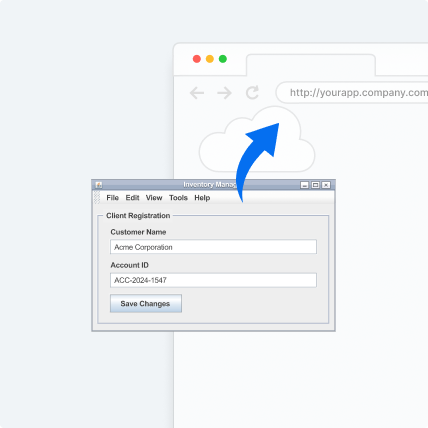
Get browser-based access to your existing Swing UI fast. The application runs on a JVM on the server side, while users access it through a URL like any web app. No more packaging desktop clients, handling per-machine updates, or managing Java installs on user devices.
Phase 2: Modernize incrementally
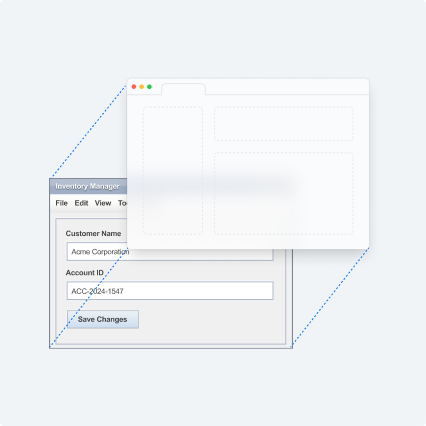
Once the app is accessible in the browser, modernize at your own pace — screen by screen, starting with the highest-impact areas. Build new web views using Vaadin (server-side Java UI), reuse your existing Java domain logic and services, and replace Swing views with modern web views as you go.
The toolkit also includes built-in automation that helps convert many existing Swing UIs into modern Vaadin web views, so you can generate a working baseline faster rather than rebuilding every screen from scratch.
Phase 3: Complete modernization
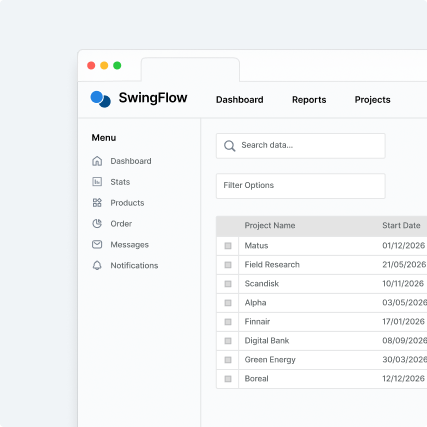
Over time, more of the UI moves to the web until Swing is no longer needed. No big-bang cutover. No parallel system. No frozen development.
You can access the potential of modern web technologies much sooner than with big-bang techniques, and your users can continue doing business as usual without having to make a sudden switch to the new application.
Ready to get started?
Want to see what running Swing in the browser looks like in practice? Head to the Swing Modernization Toolkit page and fill out the form. We'll follow up to understand your setup and recommend the best next step.
- Submit the form
- We schedule a short call to review your app and requirements
- You'll get clear recommendations on next steps
No commitment. You decide whether to proceed.