My first job was to write a new module in an Oracle Forms 6 application. A couple of years later, the company wanted the entire application migrated to Java, and since I was a young developer who knew both Oracle Forms and Java, the migration landed on me. I did it by hand and it took a while. In the end everything worked, and the customer hasn't touched Oracle Forms since.
These days I work as a consultant at Vaadin, and Oracle Forms migrations are still a steady source of work. So I set myself a question: how much of that manual process could an AI coding agent do today? I gave myself two weeks, picked a small Oracle Forms application, and used Claude Code to migrate it to Vaadin and Spring Boot. Here's what I found.
Migration workflow
I didn't start by pointing Claude Code at the source files. I started by writing down the decisions a migration needs before a single form gets touched: which Java web framework, which persistence layer, whether the old absolute-positioned layout should be preserved or replaced with something responsive.
As a consultant, I don't think one solution will work for every customer. That kind of architecture decision has to be made before you migrate the first form, not while you're doing it. Vaadin was the obvious call for the UI. For persistence, I left Hibernate versus jOOQ as a customer-specific choice.
Those decisions became a written ruleset that Claude Code could refer back to.
From there the process ran in stages. First, extract a plain technical inventory from the Oracle Forms source: what fields, what triggers, what validations exist, with no opinion yet about Java or Vaadin. Then merge that inventory with the architecture ruleset into a concrete specification for the new view. Split the specification into tickets small enough to implement and check independently. Only then generate code.
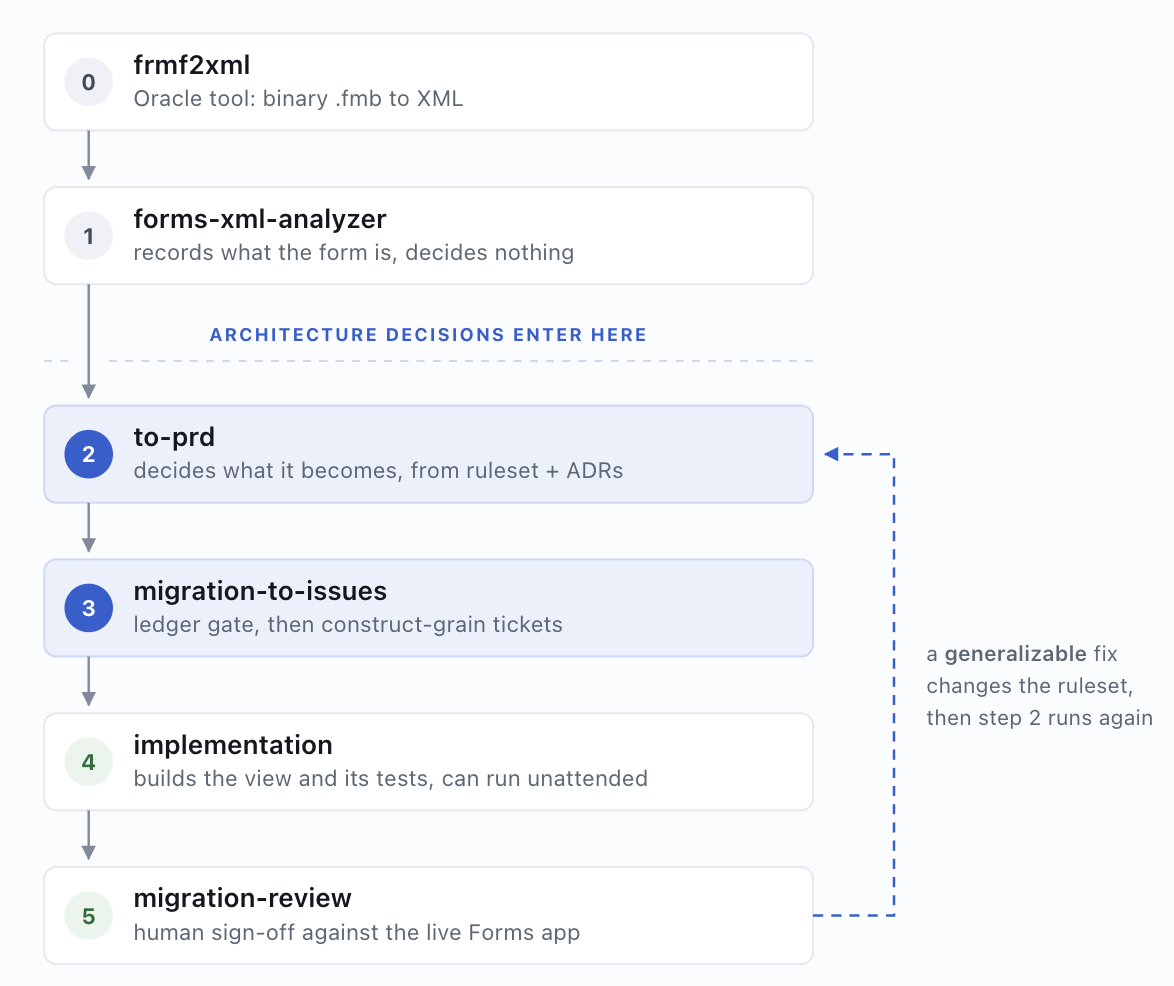
I picked Oracle's own Summit demo for this, because real Oracle Forms applications are almost never public and finding one with open sources is difficult.
This is the ORDERS form in Oracle Forms, followed by the migrated Vaadin view:
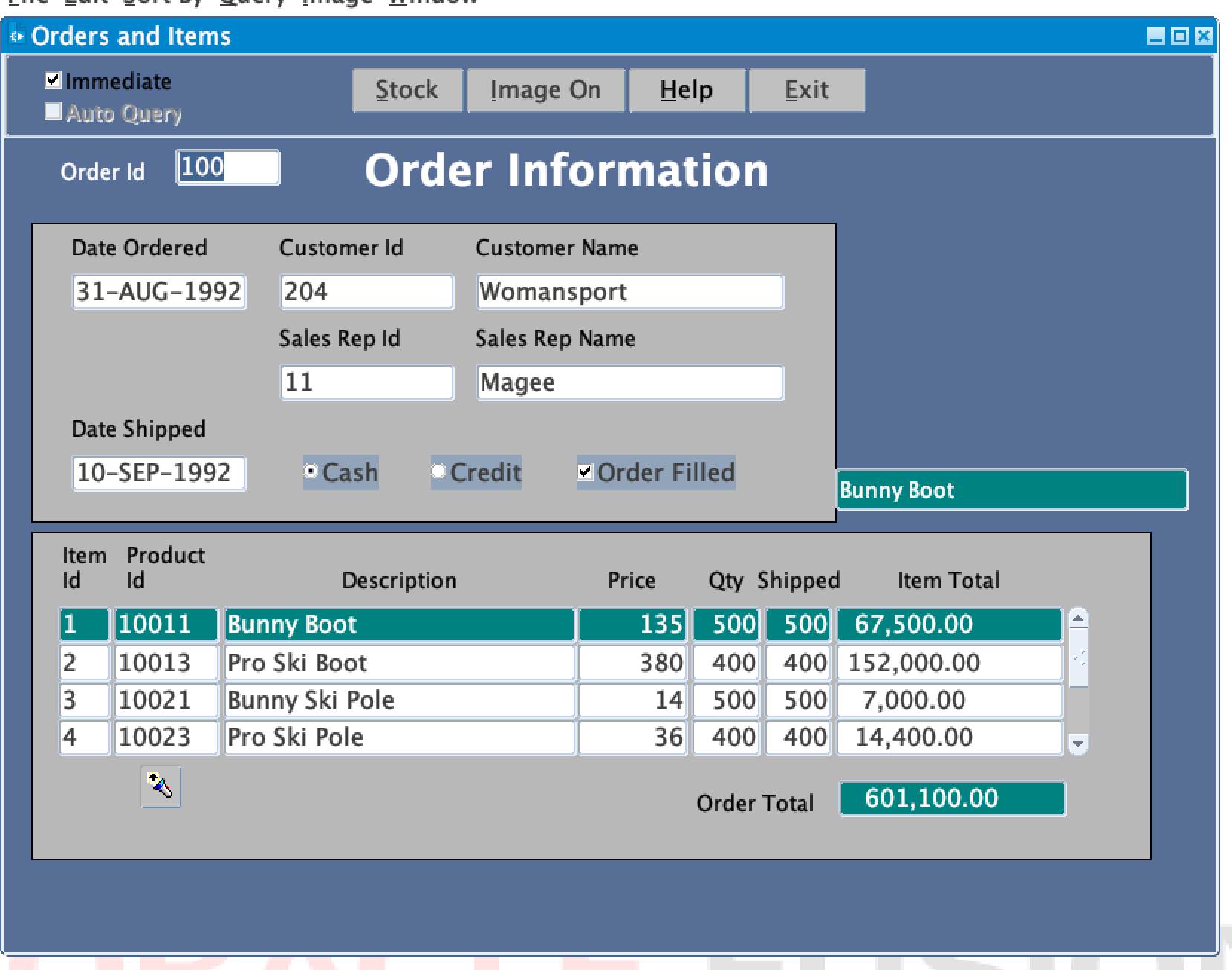
Before: the ORDERS form running in Oracle Forms.
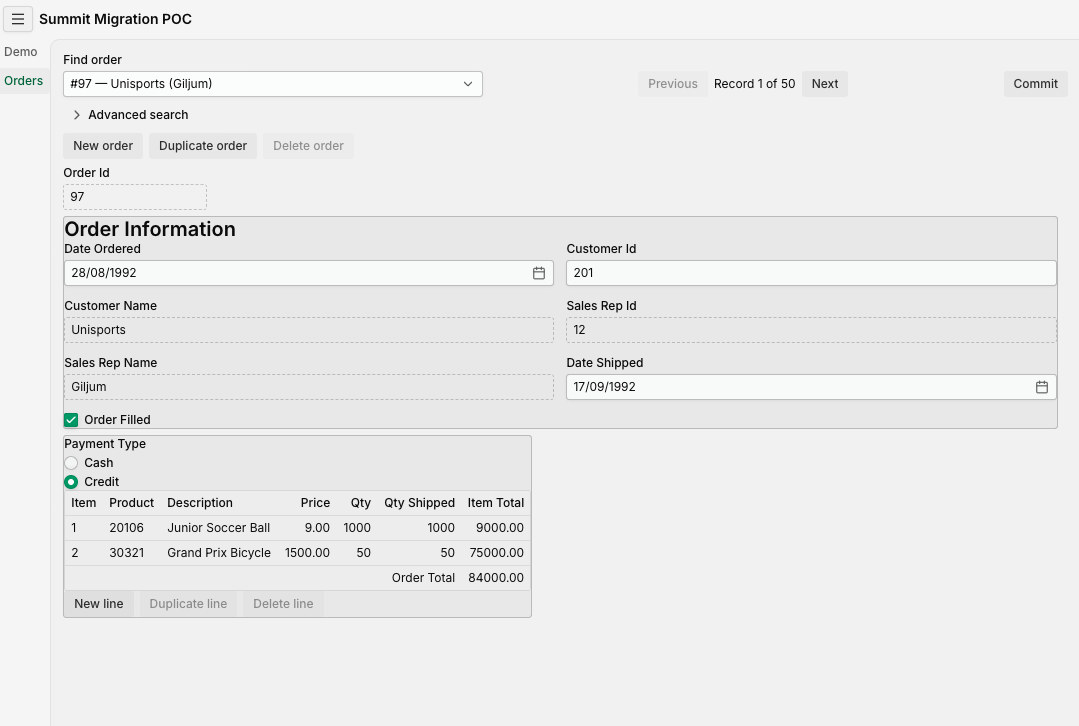
After: the same screen in Vaadin, with component defaults and no design system applied.
The Vaadin view uses component defaults only. The per-field fonts, colors and bevels of the Oracle Forms screen are dropped rather than translated, because visual styling belongs to the theme. Applying a design system is a separate step.
The ORDERS form contains 183 form elements and 45 PL/SQL triggers, formulas and summaries, in four blocks. Each of the 45 pieces of logic ends in one of three places: it stays in the database as a trigger, it moves to Java as a domain rule, or it is removed because the new architecture already covers it. One example of the third case: a lookup that needed a separate PL/SQL function was removed, because the query that loads the record already returns that value.
What the AI already knew
The part that surprised me most wasn't code generation. It was that Claude already understood Oracle Forms behavior I hadn't explained.
Oracle Forms blocks navigation until a field passes validation. You cannot tab away from a bad value. Vaadin, like most web UIs, doesn't work that way: a user can leave an invalid field and only gets stopped at save time.
Claude told me that's how Oracle Forms was working, and it already knew how Vaadin's validation works too. The decision was mine to make: I couldn't keep that behavior. It had surfaced the mismatch on its own and named the actual tradeoff, rather than silently picking one for me.
It did the same with Oracle Forms alerts. Without being asked, it proposed turning a Forms SHOW_ALERT confirmation into a Vaadin confirm dialog. And for a PL/SQL formula that validated a numeric field, it translated the logic straight into a Java validator that matched the original rule. It's really good at finding ways to migrate things, but it needs guidance. You still have to pick the result.
Locking got the same treatment. Oracle Forms locks a database row the moment a user starts editing it and holds that lock until they finish, which only works because each user has their own dedicated connection. I replaced that with an optimistic check at save time, using Oracle's built-in ORA_ROWSCN column to detect a conflicting edit, with no schema change at all.
Not everything got resolved that cleanly. Standard Java applications share a pool of connections across many users, and that doesn't map onto Oracle Forms' one-connection-per-user model as neatly as the row-locking swap suggests. I talked through the tradeoffs with Claude and left the deeper question open rather than forcing an answer. The decision was for this migration to use a pool of connections.
Running it
The migration of the Order view has been done twice. The third version was only specified, not implemented.
My first full run shipped a header where fields had been reordered, a bordered group was gone, and a radio button field had been flattened into a plain text box. The AI's own summary reported 183 elements migrated and nothing dropped. The screen was still wrong. Counting elements isn't the same as rendering them correctly.
I didn't fix that by checking the screen more carefully by hand. I turned layout fidelity into something the build had to prove automatically: field order, grouping and section titles now had to render correctly, not just get noticed by a human when they didn't.
A second gap followed the same shape. Record actions like New, Duplicate and Delete were missing or half-wired in the first pass. Rather than hand-fix that one form, I generalized the fix: any base-table block that permits insert and delete gets those three actions, whether or not the original form had an explicit trigger for them.
My second full run picked that rule up automatically and got the whole family of actions right, at both the master and line-item level, without me touching it again.
Fewer issues were found, but I wanted to reduce the human verification part, so I built a migration review skill and improved the traceability. So the third run will add an even stricter check, one that traces every field-level decision (a default value, whether a field stays editable) to a ticket and a test, so nothing gets silently dropped.
I ran out of my two weeks before finishing it, so it stays a documented plan rather than a proven result. I'll be upfront about that gap, and about the fact that Summit's PL/SQL is genuinely simple: no stateful packages, no dynamic SQL, nothing that stress-tests the harder cases a real production form would carry.
What I'd tell you before you start
Don't translate one-to-one. You'll spend a year or two just building an Oracle Forms skeleton in Java. Screens that have survived fifteen or twenty years usually did so because they're the ones power users fly through with a keyboard, without looking at the mouse, and that muscle memory deserves as much attention as the migration plan does. My first step on a real project would be talking to those users about what to keep, not opening the .fmb file.
I've put the code, the mapping rules, and the architecture decisions from this experiment on GitHub: jcgueriaud1/forms-summit-migration. If you're sitting on an Oracle Forms application nobody wants to touch, it's a reasonable place to see what two weeks of guided AI migration actually looks like, and to try the same process on one of your own forms.
If you're weighing this against the other ways off Oracle Forms, we lay those out on the Oracle Forms to Java page.