
SwingBridge 1.2 is out. The headline is interoperability: your existing Swing code and your new Vaadin views can now call each other directly, in plain Java, with the threading handled for you. The release also improves in-browser responsiveness, adds support for NetBeans RCP applications, and moves to the current Vaadin platform.
SwingBridge runs a Java Swing application in the browser and lets you modernize it to Vaadin one screen at a time, without a full rewrite. Interoperability is what makes that gradual path practical.
Interoperability: Swing and Vaadin views that talk to each other
Incremental modernization means old and new screens run side by side while you migrate. That only works if the two halves can share data. A new Vaadin view needs to read what the Swing app holds, and a Swing screen needs to hand off to a Vaadin dialog and act on the result.
SwingBridge 1.2 makes that boundary a two-way API. A Vaadin view can call into the running Swing application, and the Swing application can call back into Vaadin. Both directions are plain Java and type-safe, and SwingBridge manages the threading between the Swing event dispatch thread (EDT) and the Vaadin UI thread.
Why this matters for modernization
Interoperability turns the three SwingBridge paths (web-enable, extend, modernize) into one continuous path:
- Extend gets stronger. A new Vaadin view can read and write the same live state the Swing screens use, instead of reimplementing access to it.
- Modernize gets safer. When you replace a Swing screen with a Vaadin one, the new screen keeps talking to the parts of the app that haven't moved yet, so you can migrate a workflow one piece at a time.
The app stays one working application throughout the transition.
How it works
You annotate your existing Swing code and let SwingBridge generate the plumbing.
On the Swing side, annotate a method to expose it. Methods that might block, such as anything that shows a dialog on the EDT, can be exposed asynchronously so the Vaadin caller never waits on the desktop UI:
```java
@ExposedMethod(invocation = Invocation.ASYNC)
public boolean confirmLeaveCurrentEditor() {
 return editorsRegistry.canLeaveCurrentEditor();
}
```
A Maven plugin scans your annotated classes at build time and generates a typed bridge interface plus its proxy code. From a Vaadin view, you get a handle to that bridge and call the method. The ASYNC method above is exposed as a CompletableFuture, with the result delivered back on the right thread:
```java
SwingBridge.interop().of(EditorBridge.class)
 .requestAsync(EditorBridge::confirmLeaveCurrentEditor)
 .thenAccept(canLeave -> { /* update the Vaadin view */ });
```
The other direction, Swing calling Vaadin, uses @VaadinCallback. You choose how each callback reaches the Vaadin UI thread: fire-and-forget, blocking until the handler returns a value, or detach-safe for events that may outlive the view. SwingBridge validates these choices when you register them, so a misconfigured callback fails fast with a clear message.
Under the hood, results relay off the EDT before returning to your code, which avoids the deadlock you would otherwise hit when a callback re-enters the Swing side. You just write straightforward Java, and the threading is handled for you.
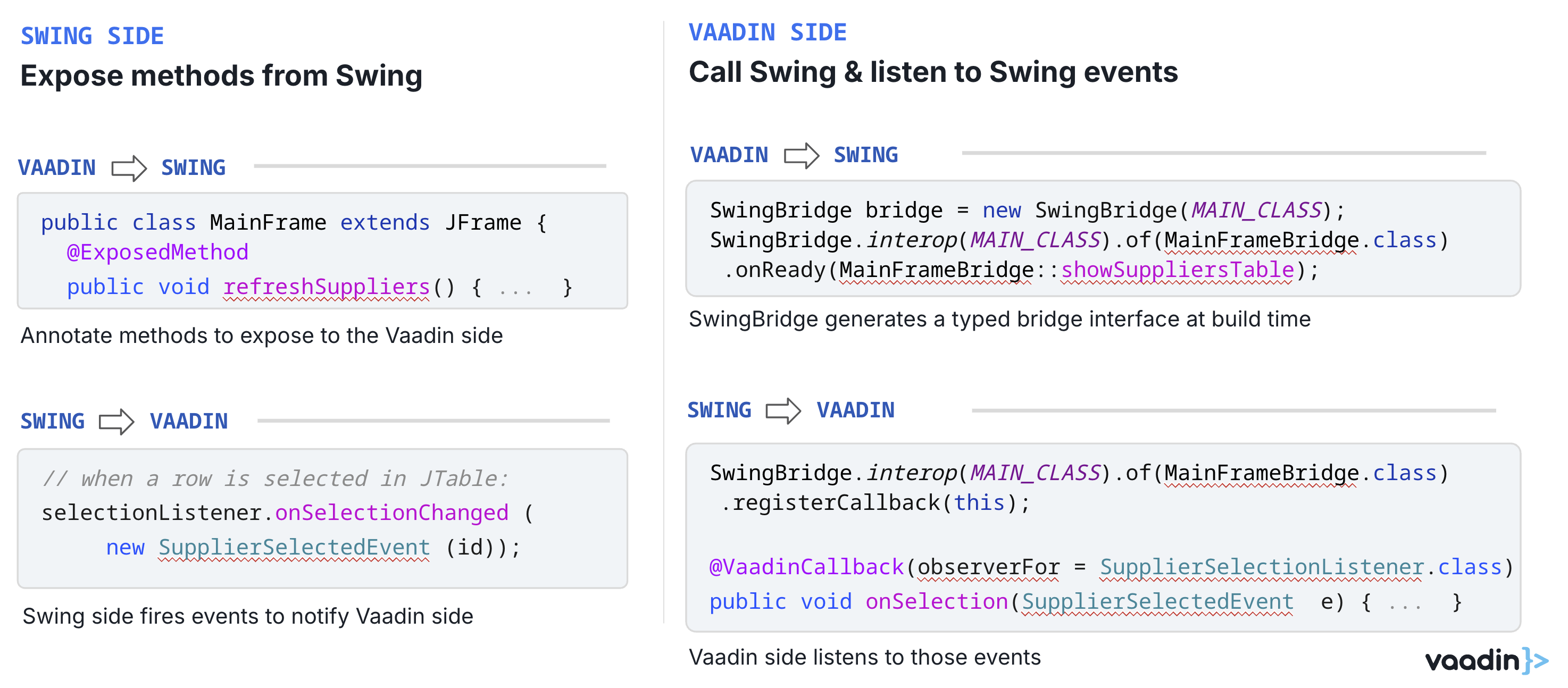
SwingBridge creates a type-safe bridge between Swing and Vaadin, enabling Vaadin views to call Swing methods and react to Swing events during application modernization.
Smoother responsiveness in the browser
SwingBridge renders your Swing UI on a server-side JVM and paints it in the browser. In 1.2, the rendered canvas stays in sync with the Swing window's own dimensions, so the browser view tracks the application's layout more faithfully and resizing behaves correctly.
NetBeans RCP support
Many long-lived Java desktop applications aren't plain Swing. They're built on the NetBeans Rich Client Platform (RCP), which adds its own window system, module framework, and lifecycle on top of Swing. SwingBridge 1.2 supports embedding NetBeans RCP applications, so they can take the same path to the browser.
This keeps SwingBridge's multitenant model rather than treating RCP as a single-user case. Each session runs with its own isolated user directory and lifecycle, and sessions are torn down cleanly when they end, so many users can share one server. You can bring across a full application shell, or embed an individual view and navigate into it from elsewhere in the app.
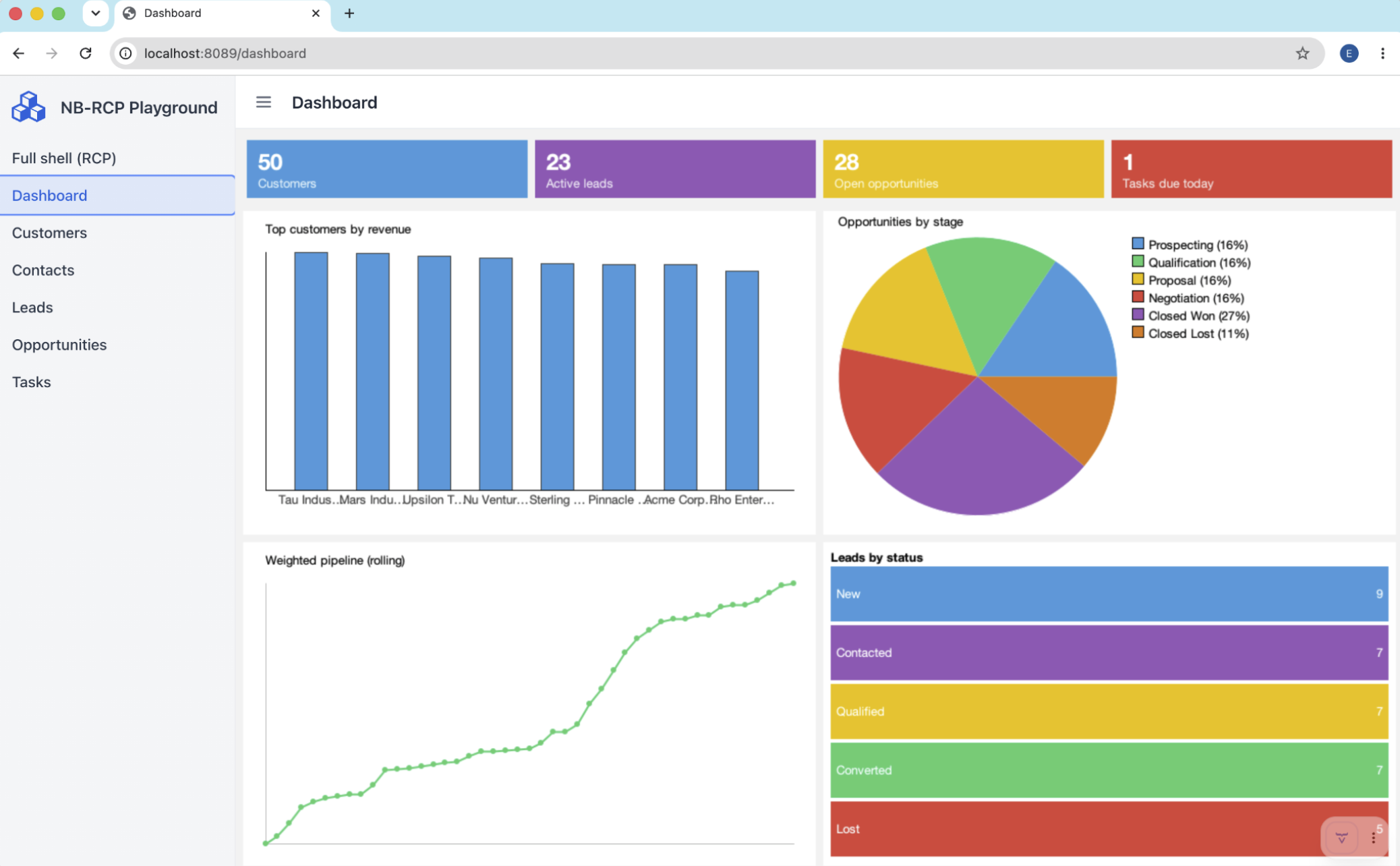 Example of a NetBeans RCP application modernized for the web with SwingBridge, including the full application shell, navigation, and dashboard views.
Built on the current Vaadin platform
SwingBridge 1.2 tracks the latest Vaadin release, so new projects and the Vaadin views you build alongside your Swing app start on current framework APIs, components, and tooling. The end state of modernization, a Vaadin web app with no Swing dependencies and no SwingBridge runtime, stays aligned with the current framework from the start.
Other improvements
- Clearer failure path. When a Swing app fails to launch, SwingBridge now shows an in-page error view in the browser instead of a blank canvas.
- Broader library compatibility. A new JGoodies demo shows SwingBridge running an app built with that UI library.
Upgrading to 1.2
Most existing SwingBridge projects upgrade by bumping the version. Note that the library packages were renamed to com.vaadin.swingbridge.* in this release, so you'll need to update imports when coming from an earlier version. Check the release notes for the exact steps.
Try it
Point a SwingBridge project at 1.2 and try the interop API: wire a new Vaadin view into your existing Swing app and have them exchange data. The skeleton starter is the fastest way to get started
New to Vaadin SwingBridge? Start at the SwingBridge page: run your Swing app in the browser first, then modernize at your own pace.
Working through a Swing or NetBeans RCP modernization? Get in touch and we'll recommend the next step.