
Last updated in 2026.
Java Swing has been supporting enterprise applications for decades. However, Swing is now in maintenance mode and no longer reflects the state of the art in application development. But does that mean that Java Swing is deprecated, and what are the alternatives for organizations that use Swing?
.png?width=2261&height=1257&name=Frame%202%20(3).png)
Explore IZUM's transition from Java Swing to Vaadin Flow.
What is Java Swing used for?
Introduced in 1997 as part of the Java Foundation Classes (JFC), the Java Swing framework is a GUI toolkit for building desktop apps using familiar Java code. It includes plenty of pre-built UI components, making it easy for developers to quickly create interactive desktop apps.
Java Swing is used broadly – but it’s particularly popular in the enterprise. Enterprise applications built with Swing include complex business apps such as CRM, ERP, and various critical internal tools, many of which are in daily use.
Is Java Swing deprecated?
Java Swing remains an integral part of Java Standard Edition (Java SE), and Oracle continues to provide official support. In other words, Java Swing is not deprecated in the strictest sense of the word.
While Swing is not deprecated, it's important to note that Java Swing is in maintenance mode. Maintenance mode means that Oracle provides only ongoing bug fixes and security updates for Swing. Maintenance ensures the stability and security of Java Swing, but there is no active development of new features or major enhancements.
So far, Oracle has not announced any plans to deprecate Swing in the foreseeable future – so you can expect ongoing security patches and bug fixes.
This “hanging in the air” status – neither deprecated nor under active development – reflects the fact that Swing is still supporting many desktop applications, particularly in the enterprise environment.
What is the outlook for Swing?
Supported, yes, but Java Swing’s evolution has stagnated. Forward-thinking developers are increasingly exploring modern alternatives aligned with today’s development trends.
That doesn’t mean Java Swing is going away anytime soon. The extensive use of and investment in Java Swing apps across the enterprise means we’ll likely see Oracle continue to offer critical support for Swing in the foreseeable future.
Nonetheless, the focus is on maintaining the existing functionality and addressing bugs and security threats. We do not expect to see significant new features or major enhancements.
Because Swing is no longer being enhanced, its role in newly built apps is diminishing as modern web frameworks such as Vaadin Flow gain traction thanks to better UX and improved performance. That said, the Java Swing community remains active, and Swing developers continue to share knowledge and resources online.
Why some developers still use Swing
Modern frameworks offer a better alternative to Java Swing, but many developers continue to use Swing. The biggest argument for doing so is maintaining complex, legacy apps.
Organizations relying on large, complex applications built on Swing may not be able to undertake the cost and effort of wholesale migration to a new platform. As much as progress can’t be delayed forever, replacing legacy applications can be expensive and cause disruption in daily work, so using Swing with Oracle's ongoing caretaking support can make sense.
Developers with extensive Java Swing experience may also find it a comfortable and familiar choice – which, for the moment, may offer these developers faster development cycles and easier maintenance steps.
After all, with the exception of Vaadin, which uses 100% Java, many modern frameworks rely on languages such as JavaScript, JSX, CSS, etc. Switching to web frameworks such as React, Angular, Vue.js, or next.js, therefore, involves a substantial learning curve for Swing developers.
There’s also something to be said for framework maturity. Over twenty years, Swing built a mature and stable framework. Swing has a wealth of resources, documentation, and community support – all of which can “swing” the odds for certain projects.
Limitations of Java Swing
Continuing to use Swing makes sense under some conditions, but sometimes, this decision is in balance. It most likely doesn’t make sense to start a green field project using Java Swing. For everything in between, it’s worth considering the drawbacks of Swing when deciding whether to perpetuate existing Swing-based projects:
- Outdated UI: Swing's design aesthetics and user experience principles are rooted in an earlier era of software development. Compared to web apps, Swing appears outdated and less visually appealing.
- No modern web standards: Swing doesn't natively support modern web standards like HTML5, CSS3, or JavaScript. Therefore, it is hard to integrate Swing applications with web-based components or services.
- Lack of support for mobile devices: The lack of support for web standards also means that Swing is not a good fit for mobile platforms. Mobile apps built with Swing require significant workarounds and result in subpar UX on smaller screens and touch-based devices.
- Maintaining Swing applications: The framework's complexity and the lack of modern development tools and practices can make it tough to maintain Swing apps, whether refactoring code or adding new features.
- Resource consumption: Apps built with Swing can consume significant system resources, particularly memory. This can be a concern for users with older hardware or limited resources.
- Accessibility limitations: Swing accessibility is strongest on Windows through the built-in Java Access Bridge. On Linux and macOS, support is less standardized and depends on platform-specific integrations. In contrast, web applications use HTML, ARIA, and WCAG to provide a more consistent accessibility model across browsers and operating systems, making compliance easier to achieve and verify.
Taken together, these limitations make a strong case for modernizing Swing applications. Rather than continuing to invest in a desktop technology that no longer aligns with modern application requirements, organizations can preserve their business logic while moving to a web-based UI. This approach reduces technical debt, improves maintainability and accessibility, and enables applications to evolve with changing user and business needs.
What is replacing Java Swing?
There are a couple of Java Swing alternatives, each with unique use cases. JavaFX is considered the official successor to Swing. It offers a modern UI and support for CSS styling and FXML. Compared to Swing, JavaFX offers better performance for complex UIs.
SWT (Standard Widget Toolkit) was developed for the Eclipse platform and uses native controls as much as possible. SWT is known for its performance and native appearance.
Vaadin as an alternative to Swing
Vaadin is a full-stack framework that lets Java developers build modern web applications entirely in Java. Developers create UIs using Java components, bind them to data, and handle user interactions without writing frontend code.
For Swing developers, the transition is straightforward. Vaadin's component APIs and programming model closely resemble those of Swing, making them familiar and easier to learn than frameworks such as JavaFX, which introduce a different approach to UI development.
Unlike Swing, which was built for desktop applications, Vaadin is designed for the web and cloud. It enables teams to preserve their Java expertise while building responsive, modern applications that run in any browser.
Comparing Vaadin UI framework with Java Swing
| Feature/Aspect | Vaadin Flow | Java Swing |
|---|---|---|
| Type | Web Framework | GUI Toolkit |
| Runtime Environment | Primarily Web-based | Desktop-based |
| Technology Stack | Pure Java | Pure Java |
| User Interface | Modern, responsive web interfaces | Traditional desktop interfaces |
| Deployment | Deployed on web servers | Runs on client machines |
| Ease of Use | Easy to create and maintain modern UIs | More complex for modern UI designs |
| Performance | Highly scalable for web applications | Suitable for desktop applications, less scalable for web |
| Community Support | Growing, with a strong focus on web apps | Established but older community |
| Learning Curve | Moderate, requires knowledge of web technologies | Moderate, purely Java-based |
| Integration | Integrates well with other web technologies | Limited to desktop environments |
| Accessibility | Built-in support for accessibility standards | Limited support, requires additional libraries |
| Customization | Highly customizable with web technologies | Customizable, but limited to Java capabilities |
| Security | Web-based security features (e.g., HTTPS, CSP) | Traditional security, less focus on web-specific threats |
| Maintenance | Easier to update and maintain remotely | Requires updates on each client machine |
| Future Outlook | Strong future with the shift to web apps | Declining, with a shift towards modern web frameworks |
Web accessibility with Vaadin
Vaadin also introduces improved scalability and is easier to update and maintain remotely compared to Java Swing, where updates are made on client machines. Flow is also intrinsically better at supporting modern accessibility standards.
Vaadin comes with over 50 ready-to-use, full-stack components designed with accessibility in mind, helping you meet both ethical standards and legal requirements. These components adhere to comprehensive accessibility guidelines, streamlining the process of building inclusive web applications that cater to all users.
Growing platform under active development
However, arguably the biggest differentiator is that Vaadin is under active development in alignment with the ongoing shift to web apps that use web- and cloud-centric application frameworks.
In contrast, Java Swing receives maintenance updates only and will remain firmly chained to the desktop environment.
See the Vaadin roadmap on GitHub -->
The case for modernizing Java Swing applications
Modern web frameworks are popular because they address the limitations of the desktop UI. Breaking free from Java desktop applications built with Swing and moving applications to the web hold benefits including:
- Enhanced UX: Modern web frameworks enable visually appealing UIs that meet contemporary design standards. Pre-built components, responsive layouts, and interactive elements work together to deliver an enhanced user experience.
- Performance and scalability: Web frameworks are designed to handle high traffic loads through client-side rendering, asynchronous communication, and caching mechanisms.
-
Shorter development cycles: Modern frameworks and libraries are designed to streamline development, offering more efficient ways to build and maintain applications. This can lead to faster development cycles, as developers can leverage pre-built components, better tooling, and more robust ecosystems.
- Maintenance costs: Modernized applications lead to lower ongoing maintenance due to improved code quality and readability. Thanks to updates with modernized, modular code, bug fixes are easier. There is also a lower dependency on legacy skill sets, reducing specialized maintenance overhead.
- Delivery costs: Post modernization, teams gain accelerated deployment through streamlined CI/CD pipelines - alongside more efficient resource allocation with cloud-native deployment options.
Overall, organizations gain significant long-term savings from reduced technical debt. It also means improved scalability and performance, lowering operational costs.
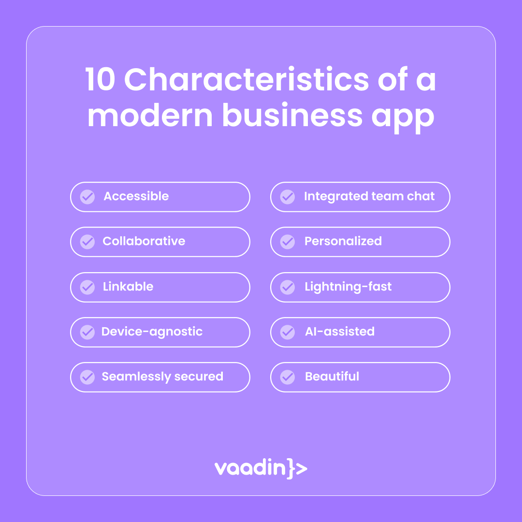
Modernized applications also benefit from enhanced security and compliance, reduced risk of incident-related expenses, better resource utilization, and reduced need for extensive hardware upgrades. Learn more about the ten characteristics of modern business apps.
Is it worth modernizing legacy apps?
It raises the question, though: what if an organization simply isn’t in a position to replace legacy apps? After all, many legacy applications still hold significant value within an organization, built on years of investment and tailored to specific business needs. Simply discarding these applications would be like throwing away valuable assets.
Modernization could be the road forward – taking advantage of the capabilities of existing legacy apps and preserving the value embedded, while unlocking the full potential to meet evolving user and business expectations.
Steps to modernizing Swing applications
Modernizing a Java Swing application doesn't have to be a complete rewrite. With the right strategy, you can modernize incrementally while continuing to deliver value to users throughout the process.
A typical modernization journey looks like this:
Assess your application: Review your application's architecture, UI, dependencies, and business-critical workflows. Identify which parts would benefit most from modernization and define clear business and technical goals.
Plan an incremental migration: Instead of replacing the entire application at once, prioritize the screens and workflows that deliver the greatest value. An incremental approach reduces risk and allows your team to continue shipping features while modernizing.
Use the right migration tools: Tools such as Vaadin SwingBridge let you embed existing Swing views inside a modern Vaadin application. This enables you to migrate one screen or feature at a time, combining legacy Swing and modern web UIs in the same application until the migration is complete.
Test and refine: Validate each migrated view to ensure it meets functional, performance, and accessibility requirements. If the user experience changes significantly, plan for user communication and training to ensure a smooth transition.
A good example of modernizing core apps built with Java Swing is how IZUM, a Slovenian institute, successfully modernized its library software. The original software, built with Java Swing, lacked mobile support and relied on outdated technology.
IZUM migrated the Swing application to Vaadin Flow, a framework compatible with Swing. This allowed the reuse of over 90% of existing code, significantly speeding up development. The new web application is mobile-friendly, accessible, and well-received by users. The successful migration, completed in just two years, demonstrates Vaadin Flow's capability to rapidly modernize Java Swing applications.
Wrapping up
Java Swing has served developers well for decades, but it no longer meets the demands of modern application development. While it remains part of the JDK, building new business applications with Swing—or continuing to expand existing ones—becomes harder as expectations for web access, accessibility, and cloud deployment continue to grow.
Fortunately, modernization doesn't have to be a complete rewrite. Vaadin SwingBridge lets you modernize incrementally by combining existing Swing views with modern web UIs in the same application, reducing risk while preserving your existing investment.
If you're planning the future of your Swing application, learn how Vaadin SwingBridge can help you modernize at your own pace. Book a free assessment to discuss the best approach for your application.